One sermon.
A full week of content.
Every Sunday, a pastor pours their heart into a message that reaches 200 people in a room. By Monday, it's gone. ETS exists to make sure no sermon dies on the stage.
 1 sermon
“I got Monday back.”
— Comms Director, 350-member churchVoice & Personality
ETS speaks like a sharp, capable friend on your church comms team. Not preachy. Not corporate. Not robotic. We understand the mission — we're here to multiply it.
Objection: “Is this going to create more work to edit?”
Reframe: “Every output is review-ready, not raw.”
Proof: “5 posts, 1 blog, 1 guide — from one upload.”
Objection: “Will this dilute the sermon's message?”
Reframe: “The words stay yours. We just extend their reach.”
Proof: “Under $100/mo, no new hire needed.”

Logo System
The ETS logo features a rounded-square “S” icon with an input node (circle) on the left and an output arrow on the right — representing one sermon going in and many content pieces coming out. The system includes stacked, horizontal, icon-only, mono, badge, and initials variants.














Color System
Purple-first, grounded by charcoal and electrified by lime. The palette communicates both trust (purple) and energy (lime). Light backgrounds are default. Dark mode is supported but not primary.
#111111 · 17.1:1 AAA#374151 · 10.3:1 AAA#6B7280 · 4.6:1 AA#9CA3AF · 2.8:1 Decorative#F5F5F5 · 17.4:1#D1D5DB · 12.0:1#6B7280 · 4.2:1#374151 · 1.9:1 DecorativeUse Electric Lime only on dark backgrounds
Use cool neutral ramp for UI chrome
Pair purple with white or light text
Use Purple Wash (#EEEDF9) for section tints
Always pair functional colors with icons/labels
Use CMS purple (#3B1559) — that's the parent brand
Use #9CA3AF for readable body text (fails AA)
Use warm cream backgrounds (CMS territory)
Use more than 2 accent colors per composition
Rely on color alone to communicate state
Typography
Two typefaces — Inter for everything human-facing, JetBrains Mono for code and data. Both are free, open-source, and optimized for screens. Never substitute.
a b c d e f g h i j k l m
0 1 2 3 4 5 6 7 8 9 & % @ ! ?
{ } => !== && || ++
0 1 2 3 4 5 6 7 8 9 # $ @
The Power of Grace: Why Forgiveness Starts With Letting Go
Pastor Michael opened Sunday's sermon with a story about a letter he never sent. For fifteen years, it sat in a drawer — addressed, stamped, never mailed. The letter was an apology. Not to someone who had wronged him, but to someone he had failed to forgive. That drawer, he said, is where most of us keep our grace: sealed, ready, but never delivered.
The sermon explored three dimensions of grace — receiving it, practicing it, and extending it to people who haven't asked for it. Each dimension mapped to a different part of the prodigal son parable, reframed for modern church life.
700 — Heading scale (20–36px): section titles, pull quotes, card titles
600 — Subheading scale (16–28px): H2, H3, button labels, nav items
500 — UI emphasis: active nav, selected tabs, table headers
400 — Body and caption: all running text, descriptions, help text
JetBrains Mono for code, pricing, and metrics
Tight letter-spacing at display sizes (−1px to −1.8px)
ALL CAPS only at 10–11px label/eyebrow scale
Use font-weight 800 exclusively for ≥40px display
Line height 1.05–1.2 for headings, 1.6–1.65 for body
Use Inter below 10px (minimum readable size)
Use weights below 400 (no Light/Thin)
Use decorative or script fonts anywhere
Use JetBrains Mono for body copy or headlines
Mix more than 3 font weights per page

Visual Language
The ETS icon — a rounded square with input/output nodes — becomes a pattern element, a section divider, a watermark, a texture. The forward arrow represents transformation: one input, many outputs.
{/* Divider 01 — Radial Glow Band */}
{/* Sits between a light section (above) and dark section (below). */}
{/* Change the top-wave fill to match your light section bg.       */}
{/* Change the bottom-wave fill to match your dark section bg.     */}
<div className="relative bg-[#333232] overflow-hidden">
  {/* top wave — light section colour bites down */}
  <svg viewBox="0 0 1440 80" preserveAspectRatio="none" className="block w-full h-14 -mb-px">
    <path
      d="M0,0 L0,40 C240,80 480,0 720,40 C960,80 1200,0 1440,40 L1440,0 Z"
      fill="#FFFFFF"
    />
  </svg>
  {/* glow body */}
  <div className="relative h-20">
    {/* purple radial bloom */}
    <div
      className="absolute top-1/2 left-1/2 -translate-x-1/2 -translate-y-1/2 pointer-events-none"
      style={{
        width: 600,
        height: 240,
        background:
          "radial-gradient(ellipse at center, rgba(81,61,229,0.44) 0%, transparent 70%)",
      }}
    />
    {/* lime spark */}
    <div
      className="absolute top-1/2 left-1/2 -translate-x-1/2 -translate-y-1/2"
      style={{
        width: 40,
        height: 2,
        borderRadius: 2,
        background: "#D5F610",
        boxShadow: "0 0 16px #D5F610, 0 0 40px rgba(213,246,16,0.27)",
      }}
    />
  </div>
  {/* bottom wave — dark section colour bites up */}
  <svg viewBox="0 0 1440 80" preserveAspectRatio="none" className="block w-full h-14 -mt-px">
    <path
      d="M0,80 L0,40 C240,0 480,80 720,40 C960,0 1200,80 1440,40 L1440,80 Z"
      fill="#111111"
    />
  </svg>
</div>h-24 for more drama · Remove the lime spark for a pure atmosphere version{/* Divider 02 — SVG Wave Clip */}
{/* Place at the BOTTOM of the outgoing section. */}
{/* Set fill="<outgoing-section-bg>" so it masks cleanly. */}
<div className="relative -mb-px">
<svg
viewBox="0 0 1440 80"
preserveAspectRatio="none"
className="block w-full h-14"
>
<path
d="M0,40 C240,80 480,0 720,40 C960,80 1200,0 1440,40 L1440,80 L0,80 Z"
fill="#513DE5" {/* ← match your section bg */}
/>
</svg>
</div>{/* Divider 03 — Marquee Ticker */}
{/* globals.css — add once */}
@keyframes ets-marquee {
from { transform: translateX(0); }
to { transform: translateX(-50%); }
}
.ets-marquee-track {
display: flex;
width: max-content;
animation: ets-marquee 18s linear infinite;
}
{/* component */}
const PHRASES = [
"Upload. Process. Done.",
"One sermon. A week of content.",
"Extend the Sermon.",
"5 posts. 1 blog. 1 email.",
];
<div className="overflow-hidden bg-[#333232] py-3.5 border-y border-white/5">
<div className="ets-marquee-track">
{[...Array(2)].map((_, set) => (
<div key={set} className="flex items-center">
{PHRASES.map((phrase, i) => (
<span key={i} className="flex items-center whitespace-nowrap">
<span className="px-7 text-[#D5F610] text-xs font-bold tracking-wide">
{phrase}
</span>
<span className="text-[#513DE5] text-[10px]">◆</span>
</span>
))}
</div>
))}
</div>
</div>30s for elegance · Speed up with 10s for energy · Pause on hover via animation-play-stateMotion & Animation
Movement is purposeful and calm. ETS isn't flashy — animations guide attention, confirm actions, and make the interface feel alive. All animations respect prefers-reduced-motion.

transform: translateY(16px) → 0
duration: 400ms
easing: cubic-bezier(0.4,0,0.2,1)
reduced-motion: 150ms opacity only
transform: none
duration: 400ms
easing: ease
use for: full-width banners, heroes
250ms State transitions (toggle, expand)
400ms Page transitions, modals, scroll entry
2–3s Loading loops, ambient
cubic-bezier(0.4, 0, 0.2, 1)Enter:
cubic-bezier(0, 0, 0.2, 1)Exit:
cubic-bezier(0.4, 0, 1, 1)Spring:
cubic-bezier(0.34, 1.2, 0.64, 1)Design Foundations
Spacing, elevation, and layout tokens that ensure consistency across every page and component. All values are base-8.
:root {
  --ets-purple: #513DE5;
  --ets-purple-mid: #8E81EE;
  --ets-purple-light: #B8B0F4;
  --ets-purple-wash: #EEEDF9;
  --ets-purple-deep: #3B2BA8;
  --ets-lime: #D5F610;
  --ets-charcoal: #333232;
  --ets-space-1: 4px;
  --ets-space-2: 8px;
  --ets-space-4: 16px;
  --ets-space-6: 24px;
  --ets-space-8: 32px;
  --ets-space-12: 48px;
  --ets-space-16: 64px;
  --ets-radius-sm: 6px;
  --ets-radius-md: 10px;
  --ets-radius-lg: 12px;
  --ets-radius-xl: 16px;
  --ets-shadow-sm: 0 1px 2px rgba(51,50,50,0.05);
  --ets-shadow-md: 0 2px 8px rgba(51,50,50,0.08);
  --ets-shadow-lg: 0 8px 24px rgba(51,50,50,0.12);
}// tailwind.config.ts
theme: {
extend: {
colors: {
ets: {
purple: '#513DE5',
'purple-mid': '#8E81EE',
'purple-light': '#B8B0F4',
'purple-wash': '#EEEDF9',
'purple-deep': '#3B2BA8',
lime: '#D5F610',
charcoal: '#333232',
}
},
borderRadius: {
ets: '12px',
},
fontFamily: {
sans: ['Inter', 'system-ui'],
mono: ['JetBrains Mono', 'monospace'],
}
}
}lime: #D5F610 → #D5F610 (same)
text: #111111 → #F5F5F5
body: #4B5563 → #D1D5DB
border: #E5E7EB → #2A2A2A
wash: #EEEDF9 → #1E1B3A
Component Specimens
Core UI patterns used across the product. Every component documents its states. Build these 1:1 in your component library.
App Icons
The icon system at various sizes and contexts. The full icon (with nodes) is used at 32px+. Below 32px, crop to the rounded square only.


app/opengraph-image.tsx.Apple applies squircle mask automatically
Safe zone: 10% inset from all edges
Dark mode tinted variant: iOS 18+ support
ets-icon-ios-1024.png
Background: solid #513DE5 or gradient
Safe zone: 66% center circle — icon must fit
Renders as circle, squircle, or rounded square
ets-icon-android-fg.png / -bg.png
SVG favicon for modern browsers
Dark variant: white icon on purple bg
Include ICO fallback for legacy browsers
favicon.ico / favicon.svg
Safe area: 80% center for maskable
OG card: 1200x630, logo + headline zone
Purple gradient background, white text
ets-og-card.png / icon-192.png
Icon Library
96 SVG icons for the ETS application. Consistent 24×24 stroke-based design using purple primary, lime accent, and charcoal neutral. Click any icon to copy its filename.
/brand-guide/icons/[name].svg. Import via Next.js <Image> or inline as React SVG. Purple icons use #513DE5 primary fill. Lime-accented icons use #D5F610 as secondary fill only. Charcoal #333232 for neutral/utility actions.In Context
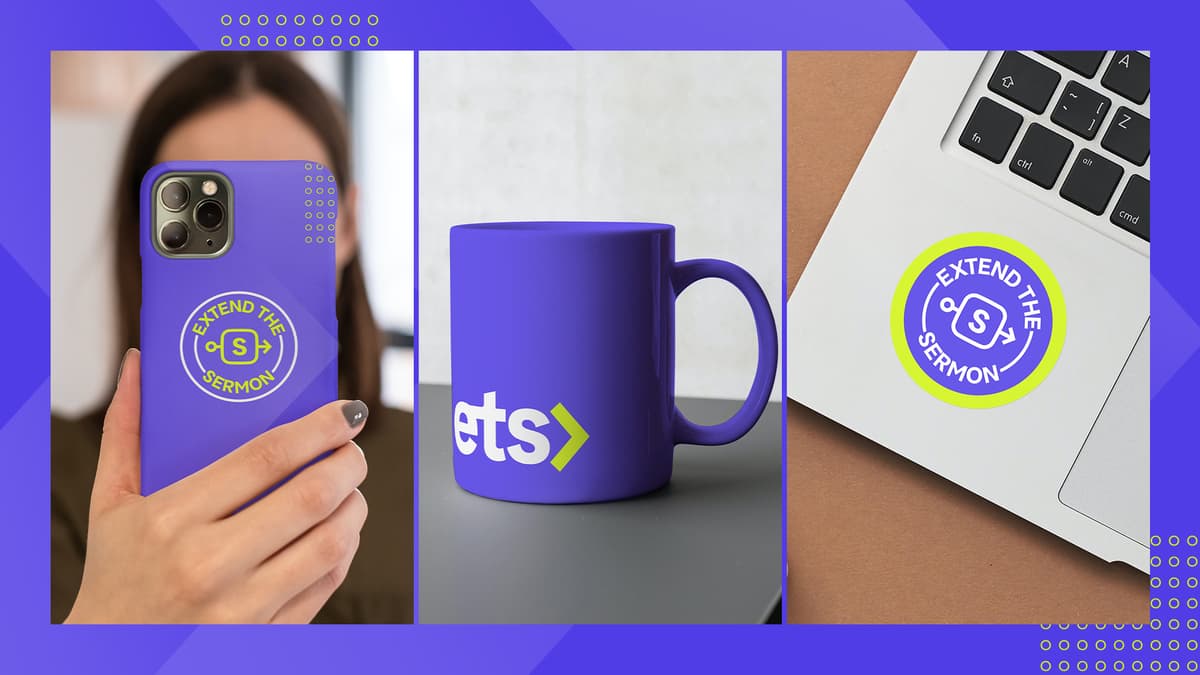
How the brand lives across digital and physical touchpoints — prioritizing the surfaces users interact with daily.
Brand Family
ETS is a sibling brand to Church Media Squad (CMS). Both serve churches, but with distinct visual identities and strategic roles. Understanding the relationship ensures consistent, non-conflicting brand application.